

I often meet managers who tell me much the same thing: “We are not a big enough company to afford help with our technologies.” I do not blame them. But this persistent myth slows the adoption of solutions beneficial to SMBs.
This myth stems from the fact that many people do not fully understand everything IT encompasses. This leads executives to bear the full burden of technology on their own, even though accessible, high-performing options exist and are tailored to their reality.
Other reasons for not investing in technology include budget constraints, priorities, the number of employees, and sometimes a lack of understanding of the technological impact on the business.
Digital transformation for SMBs
Digital transformation often scares SMBs, even though it is accessible and essential to their resilience and competitiveness, regardless of their industry or size.
Many leaders underestimate the presence of technology across all their activities, believing that managing it is beyond their reach. Yet technology is already central to their operations, and adapted solutions exist to support them effectively.
If this is a more difficult area to approach, why do we care so much about it?
The corporate answer is: as an SMB, we understand the constraints our clients face.
But to be completely honest, we like it because this is where we have the greatest impact. It is the combination of actions and recommendations that change our clients’ day-to-day reality. Every day, both for leaders and for their employees.
SMBs underestimate the role that strong technology management can play in driving their business.
Key takeaway:
- Technology is everywhere: it is at the heart of your daily operations, such as email and collaboration tools, and it directly influences your profitability.
- Lack of structure creates risk: unstructured IT decisions increase operational exposure and can have a real impact on business continuity.
- Proactivity brings peace of mind: resolving incidents as they arise does not replace proactive and planned IT management.
- There is no single technology solution: a major risk is choosing a management solution that does not adapt to your business needs over time.
- Technology as a business lever: looking beyond tools enables coherent operations aligned with business objectives.
[BLOG_POST_SUMMARY]
Everything your SMB is already managing, without even noticing it

SMB leaders do not choose to manage technology. They do it by default. This leads to decisions that are not always made with full awareness of their impact or consequences. That is normal. How can you measure the impact of a technology tool when you also have to make hundreds of daily decisions related to operations, finances, and human resources?
When we think about technology tools, we often think of an ERP or a CRM. But many overlook the fact that email, collaboration tools, access management, workstations, security, and antivirus software are the most common and most neglected tools.
Every decision adds up. Every tool becomes a responsibility.
Technology management requires control over information and specific knowledge, with a level of expertise that evolves as tools become more complex. This workload is often invisible, yet very real.
Managing technology: What it actually means
There are many terms used to describe technology management by an external partner:
- IT management
- Technology consulting services
- IT support
- Full management of information systems
For someone looking for help with their technology, it can be difficult to understand the differences.
To simplify things, an external business partner ensures that all required technology is in place and effective, so the company can operate daily without friction.
This means taking care of:
- Subscriptions
- Antivirus
- Security tools
- User licenses
- System access
- Cloud
- Automatic backups
Every employee must be able to access the right tools, benefit from proper protection, and receive the support needed for daily work.
Added to this is equipment management: purchasing computers, servers, and storage space, configuring networks and tools, deployment, and replacement.
Each new employee triggers a series of actions: creating access, assigning licenses, configuring the workstation, securing the environment, and much more.
The risks of managing everything internally

Now that we understand what basic IT management entails in a company, imagine that all of this is handled by someone who lacks the technical skills to make informed decisions across the board.
The risks increase significantly. To provide a clearer picture, here are a few of them, along with simple explanations of why these business decisions are not optimal.
Risk 1: Dependence on a key person
This is often an employee whose primary role is not IT management. Overwhelmed by tasks and limited by a lack of expertise, this person reacts more than they anticipate, without monitoring practices or certifications.
When this person is absent, everything slows down. If they leave, everything becomes fragile.
Risk 2: Lack of knowledge and training
If the employee responsible for technology handles it only part-time, they are likely to have little time to stay informed about best practices or the risks of not keeping systems up to date.
Proper training must therefore be planned to maintain experience and expertise within the company.
The level of experience of employees responsible for technology is a determining factor in the success of digital transformation and in managing technology-related risks.
Risk 3: Security and business continuity
Among all risks, security is the one most likely to compromise business continuity.
It is simple. Operating in a reactive mode can be a major obstacle to effective risk management. Let me explain. Being unable to measure the impact of a decision, or of not making one, on the system security can put your entire business at risk.
Compromised data and system downtime can result in thousands of dollars in losses in just a few moments. To better understand risk management and downtime-related losses, consult our experts' articles.
The myth of an accessible toolbox for SMBs

Today, almost all information is at our fingertips, creating the impression that everything can be managed on our own. In IT, however, there is no single model and no universal solution.
If such a toolbox existed, it would bring together all the solutions required to manage and grow every business, which is unrealistic.
Managed IT is a different kind of toolbox
The issue is that every SMB has its own objectives, pace, and tools for each stage: access management, security, collaboration, performance analysis, and user support. This is why external management must be viewed as a toolbox tailored to business needs, with flexible and scalable solutions that remain aligned with the company's operational reality.
Business partners serve as a concrete lever to structure management, accelerate development, and support growth, while reducing risk, enhancing security, and maximizing operational efficiency. This set of levers enables technology to become a true business driver, driving performance and long-term sustainability.
A Few Definitions to Ensure Clarity
Everyday technology for an SMB
Simply put, all the technology your company uses daily falls into this category. This includes the Internet, intranet, operating systems (Microsoft, Google), and antivirus software.
An IT function takes care of:
- Subscription and license management
- Equipment management
- Network and cloud management
- Operating system configuration
- User support
- Proactive monitoring and security
Common software acronyms
A software package is a standard application designed to meet common business needs across multiple organizations. It structures operations, centralizes data, and supports growth. Unlike custom software, it is built on proven practices and evolves with the business.
ERP (Enterprise Resource Planning):
- Centralizes internal processes within a single system.
- Covers key functions (finance, operations, human resources, logistics).
- Used to unify data, standardize processes, and improve operational control.
CRM (Customer Relationship Management):
- Centralizes all customer and prospect data and interactions.
- Supports sales, marketing, and customer service teams.
- Its purpose is to structure the sales pipeline and improve customer follow-up to support revenue growth.
What a managed service really covers
A managed service is not limited to support. It structures technology management. When people think about technology, they often picture more expensive and less accessible tools for smaller SMBs. Yet technology is everywhere, and third-party management services can be implemented for everyday IT usage. While this type of service is more costly than other options explained below, it provides peace of mind.
Comprehensive management that goes beyond task execution
Going beyond task execution means understanding business needs and identifying solutions to achieve business objectives.
Simply put, it means being proactive on behalf of the client. This includes preventing issues before they become visible and monitoring all technologies 24 hours a day.
This has a real impact on business continuity. This is where value is created. In prevention. In continuity. And above all, in giving managers back time to focus on what truly matters.
Internal or managed services: a simple comparison
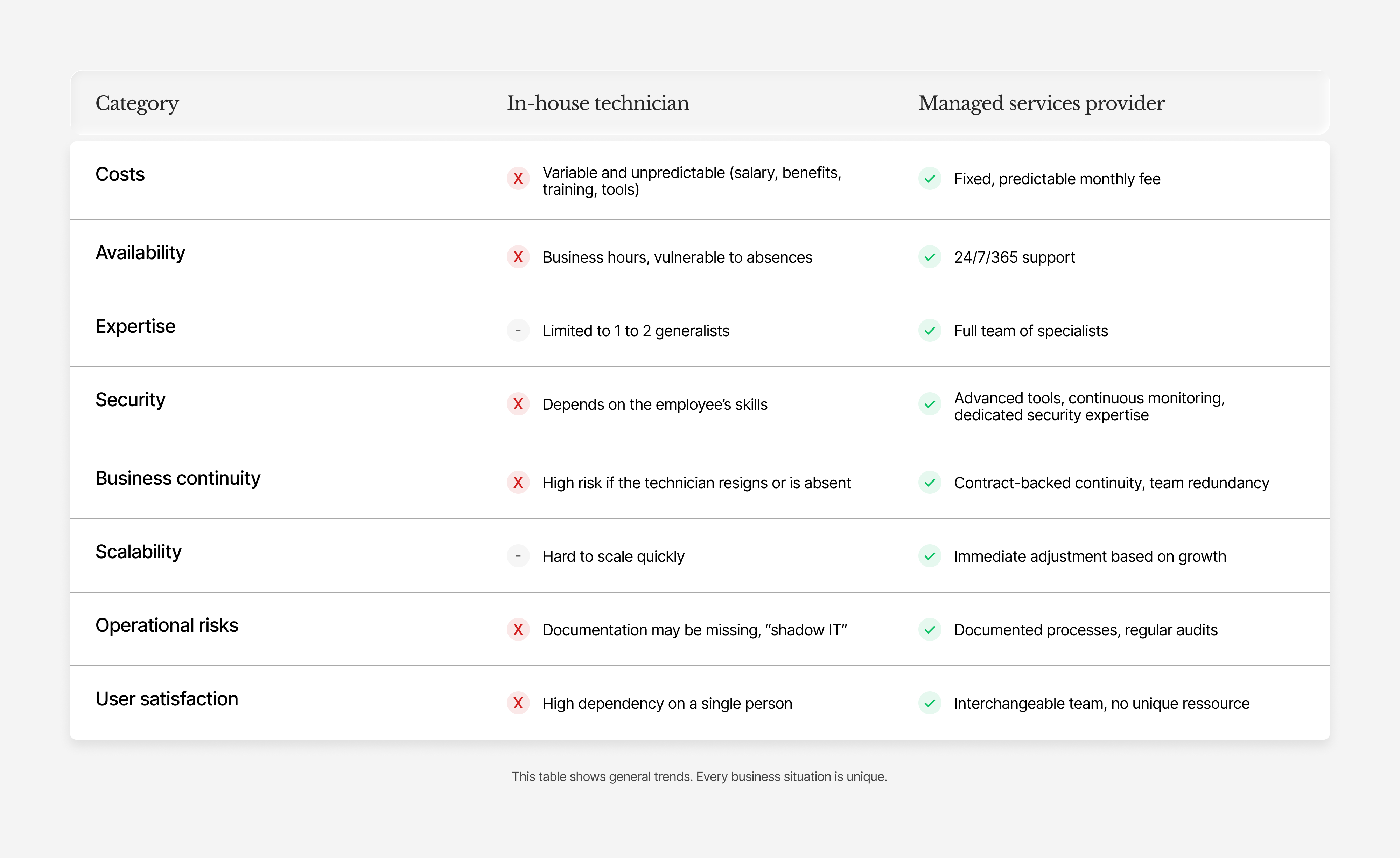
What is internal IT?
Internal IT refers to an employee or a small team hired directly by the company to manage its technology infrastructure, including workstations, servers, networks, security, and user support.
Typical role of an internal IT technician
Resolving day-to-day issues, managing user accounts, maintaining hardware, performing software updates, and providing first-level support. In an SMB, this person often wears many hats: networking, security, purchasing, and sometimes even telephony.
Strengths:
- Physical presence and fast on-site response
- Deep knowledge of the internal environment
- Direct control over daily priorities
Common limitations in SMBs
- Expertise is limited to a single person or a small team
- Absences or vacations create vulnerability
- Hidden costs (training, tools, certifications)
- Difficulty keeping up with evolving cyber threats
- Risk of dependency on a single employee
What are managed IT services?
A managed IT services provider (MSP) is an external company that, under contract, takes responsibility for the full technology management of an SMB. In our case, this is a service offered 24 hours a day, 7 days a week.
What is generally included
- 24/7 infrastructure monitoring
- Proactive patching and updates
- Unlimited technical support (phone, email, remote)
- Automated backups and disaster recovery
- Advanced security (EDR, managed firewall, filtering)
- Monthly reports and strategic reviews
What is generally excluded
- Major projects (migrations, deployments)
- Hardware purchases (managed separately)
- Custom development
- User training (often optional)
Two additional options: project-based and block hours
A strong business partner will always propose additional options when your situation is different.
Block-hour approach
This model is well-suited for SMBs that do not have enough needs to justify an internal technician or a fully managed option. Intervention only occurs when a problem arises (the break-fix model). The limitation is that this approach is reactive rather than proactive.
Project-based approach
The project-based approach is useful for companies with internal resources and longer-term implementation needs, or for SMBs already using block hours but facing a larger initiative. Think of a full server replacement, for example. The advantage is that this type of support helps structure the request and provides guidance tailored to specific needs.
Conclusion: The value of technology management for your business

Repositioning technology management first requires changing how it is viewed. Technology is more than technical execution. It is a strategic lever for the organization, because it is present everywhere, even in decision-making. Finding a technology consulting partner supports both decisions and the overall direction of the business.
For an SMB, the challenge is to establish a clear framework, make consistent decisions, and define well-defined priorities. This is possible with a partner who understands business realities, operational constraints, and growth pace.
In most cases, comprehensive management supports business objectives and daily performance by freeing up management time to focus on decisions that directly affect profitability.
Strong business technology management helps structure operations. It is built on concrete projects and measured decisions, because choices are made upstream rather than in reaction. The objective remains the same: keeping technology aligned with the organization's real needs.
When management is well structured, the benefit becomes tangible for leaders. They regain time. Time to make decisions with perspective. Time to plan. Time to grow the business instead of reacting to emergencies.
This peace of mind becomes a true asset. Fewer surprises. Less operational stress. Fewer pressure-driven decisions. Technology stops being a source of concern and becomes what it should always be: a tool serving business objectives.